
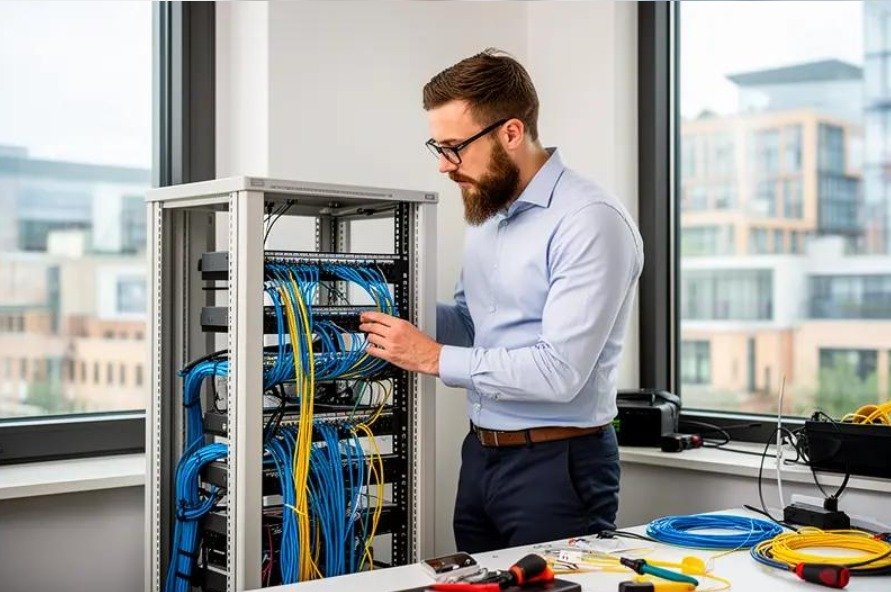
PRACTICAL SERVICE GUIDE · 12 MIN READ · DUBAI
A network designed around your working day
A working network should let people get on with their jobs. Desktops need dependable connections, printers should remain reachable, and cameras should continue recording while staff use business applications. Network installation in Dubai therefore starts with understanding the property and the activities inside it. Buying a larger router before checking those requirements can leave the original problem untouched.
CCTV Installation UAE helps plan local area networks for offices, shops and other commercial spaces. The scope can include Ethernet outlets, switches, router configuration, equipment organisation and connections for compatible security systems. Each proposal should identify the work included, the equipment being reused and any dependencies on your internet provider or existing IT administrator.
A useful installation makes everyday support easier as well as improving connectivity. Clearly named devices, labelled cables and an understandable network record help your team identify what serves each desk or camera. When you move a workstation later, the person making that change should not have to disconnect several unknown cables to find the correct connection.
Start with devices, rooms and business priorities
The first discussion should describe what must work, where it must work and when interruptions can be tolerated. A small reception network has different needs from an office using cloud calls, shared storage, wireless access points and continuous video recording. Device counts alone do not show which connections matter most during a busy period.
We consider current workstations, printers, payment equipment, servers, access points, cameras and access controllers. Planned additions also matter. A company expecting another department may need spare outlets and switch ports now, even when those positions are initially unused. Spare capacity should follow a realistic expansion plan rather than an arbitrary promise of unlimited growth.
Building conditions shape the installation. Glass partitions, finished ceilings, occupied rooms and restricted risers can affect cable routes and working hours. Before work begins, agree access arrangements with the person responsible for the premises. Where landlord or facilities approval is required, allow time for that process instead of treating physical access as automatic.
Existing information is valuable even when incomplete. A floor plan, old port list, router model and photographs of the cabinet can help prepare the survey. Passwords and configuration access should be shared only through an agreed secure process. Please do not send administrator credentials in a public enquiry or leave them displayed beside the rack.
LAN design that remains understandable
The local area network connects equipment within your premises. Its design should show the central equipment location, the outlets serving each area and the links between switches. A simple diagram often reveals problems that a shopping list misses, such as an overloaded link between floors or an access point planned without a nearby cable route.
For many smaller sites, a straightforward central cabinet with individually labelled outlet runs is practical. Larger or separated areas may need additional distribution points. The decision depends on distance, available routes, resilience requirements and access for maintenance. A second switch can be useful, but placing unmanaged equipment in an inaccessible ceiling can make future fault tracing difficult.
Different business activities may warrant separate network segments. Staff computers, guest wireless devices and cameras do not always need unrestricted communication with each other. Where the hardware supports it and the operating requirement justifies it, managed segmentation can make those boundaries clearer. Segmentation must be paired with appropriate traffic rules; naming a network separately does not define who can reach it.
Complexity has an operating cost. A design that requires specialist administration should identify who will maintain it after handover. If your company already has an IT provider, installation decisions should be coordinated with that provider. The aim is a network your business can manage responsibly, with changes documented and ownership clear.
Selecting switches for the actual workload
A network switch provides the wired ports connecting local devices. Selection involves more than counting sockets on the front. We consider usable port capacity, supported speeds, uplink arrangements, management features and power requirements for connected devices. A switch with enough ports can still be unsuitable if its uplink or available power cannot support the planned installation.
Power over Ethernet can supply compatible access points, cameras and other devices through their network cables. The switch must support the power requirements of each device and the total expected load. Some equipment demands more power during startup or when additional functions operate. Those requirements should be checked against manufacturer information rather than inferred from a general product category.
Managed switches offer controls and diagnostic information that can help with larger or segmented installations. They may allow port descriptions, traffic separation and monitoring, depending on the model. These features are useful when someone will configure and maintain them correctly. An unnecessary feature list should not replace a clear explanation of the business problem each feature solves.
Equipment placement matters too. A cabinet needs appropriate ventilation, cable management and access without blocking other services. Avoid filling every available space before considering maintenance. The person replacing a failed patch lead should be able to reach the correct port without pulling on neighbouring connections or moving powered equipment unexpectedly.
Router setup and internet boundaries
The router connects networks and commonly provides the path between your local devices and the internet connection. Installation begins by confirming the existing provider equipment and how the new router will connect to it. Provider-managed settings, account changes and service activation may require action from the internet company or the account holder.
Router configuration can include local addressing, DHCP, DNS forwarding, access rules and supported remote administration arrangements. These settings should be chosen together. An addressing change can affect printers, recorders and other devices previously configured manually. Before replacing a router, identify those dependencies and plan how each device will reconnect after the change.
We distinguish an internet fault from a local network fault. If devices can communicate internally but external services are unavailable, the investigation follows a different path from a disconnected workstation. A slow wireless connection also does not automatically indicate a faulty router. Checking each layer avoids replacing equipment without evidence that it caused the problem.
Default administration credentials should be changed, supported security settings reviewed and unnecessary external management avoided. Configuration backups should be held by an authorised owner. Firmware changes require a suitable maintenance window and a recovery plan, particularly where a router supports payment terminals, remote working or other functions that cannot tolerate an unexpected interruption.
Addressing, naming and device records
An IP addressing plan gives devices a predictable place in the network. Some devices can obtain addresses automatically; infrastructure equipment may need reservations or carefully assigned fixed addresses. The chosen approach must avoid overlapping allocations. Two devices using the same address can create intermittent symptoms that appear unrelated until the conflict is identified.
Useful records connect the logical network to the physical installation. An outlet label can point to a patch panel position, a switch port and the device using it. Names should describe a location or function consistently. An entry such as reception printer is more helpful to an office manager than a list containing only manufacturer serial numbers.
Document the network mask, gateway and relevant service settings as well as the address itself. A device can appear reachable from one part of a network while failing from another if these settings are wrong. Testing should reflect the intended users and connections instead of relying on a single successful response from the installer’s laptop.
Sensitive details deserve separate handling. The operational port map can be available to staff who need it, while administrative passwords remain with authorised people. A handover package should explain where protected backups are held and who can approve changes. Good documentation supports access control rather than becoming an uncontrolled collection of shared secrets.
Cabling and cabinet organisation
The wired network depends on physical connections that remain sound after installation. Cable routes should be agreed before pulling begins, with suitable containment and consideration for nearby services. If the route crosses finished interiors, discuss appearance and access explicitly. Neat visible work matters, but concealed bends and terminations also affect maintainability.
Permanent cables should terminate at suitable outlets or patch panels according to the design. Patch leads connect that fixed installation to active equipment. Mixing unidentified loose leads with permanent runs makes later changes harder to trace. Labels at both ends should match the records and remain readable after the cabinet is fully populated.
Testing scope must be clear. Basic connectivity testing, performance checks and formal cabling certification are different activities. If a project requires certification reports against a specified cabling standard, that requirement belongs in the agreed scope before installation. A device connecting successfully does not, by itself, establish every performance characteristic of the installed cable.
Existing cabling can sometimes be retained, but it should be assessed rather than assumed suitable. Damaged sockets, unknown routes and undocumented joints may influence reliability. Where replacement is recommended, the reason should be explained. Where reuse is sensible, the quotation should identify the limits of the checks performed and any faults requiring separate work.
Installation with a controlled changeover
Occupied businesses need a plan for the transition. Before disconnecting equipment, identify critical services, the approved working window and the person who can authorise unexpected decisions. Photographs and configuration backups can help preserve the starting point. Any rollback arrangement should be practical for the equipment involved, rather than a vague promise that everything can be reversed instantly.
New cabling and equipment preparation can often be completed before the final changeover. Devices are then moved in a planned sequence, with checks at each stage. This makes it easier to identify which change introduced a problem. Moving every cable simultaneously may appear faster, but it can make an unexpected fault much harder to isolate.
Security systems require particular coordination. Changing a recorder address or moving a camera connection can interrupt recording or authorised viewing. The responsible person should understand the affected period. Where continuous operation is required, the design must consider that requirement beforehand; it cannot be created retrospectively by asking installers to avoid every interruption.
Once the new network is active, the old equipment should not remain connected accidentally. Retained devices need a defined purpose and updated records. Retired equipment may contain configuration details or credentials, so disposal and storage should follow your organisation’s process. The installation handover should state which equipment remains in service and which items have been removed.
Testing the connections people will use
Commissioning should follow real working tasks. We check agreed wired outlets, local device communication and access to the services included in the scope. A printer test, a business application connection and a recorder playback check reveal different issues. Passing one test should not be treated as proof that every dependent function is ready.
Performance observations need context. The result depends on the test method, client device, network path and any external service involved. An internet speed test includes factors outside the LAN. A local transfer test can help assess an internal path, but it also depends on the sending and receiving devices. Record the conditions alongside any result.
Where separate networks are configured, test both permitted and restricted traffic. Staff may need a printer while guest devices should have a different access boundary. Checking that authorised use works is only half the task. The agreed restrictions should also be verified using suitable test devices and approved methods.
The final review should include labels, spare ports, equipment access and any outstanding issues. Handover is the time to explain limitations plainly. If an older workstation cannot support the intended link speed, or an external provider issue remains unresolved, that should be recorded separately instead of being hidden behind a general statement that the network is complete.
Keeping the network usable after installation
Networks change as businesses change. A new desk, additional camera or replacement access point can affect available ports, power and addressing. Before adding equipment, check the original design and update the relevant records. A small documented change is easier to support than an accumulation of temporary connections that nobody later remembers making.
Routine attention should include cabinet ventilation, connection security, equipment alerts and supported software maintenance. The appropriate frequency depends on the site and equipment. Businesses with an IT provider should agree responsibilities clearly: who monitors faults, who approves configuration changes and who holds current backups. Installation alone does not create an ongoing managed service unless one is separately agreed.
When reporting a fault, describe affected devices, locations and timing. Note whether the issue concerns local communication, internet access or one application. Photos of labels and indicator lights can help, provided they do not expose credentials or private information. These details make the first investigation more focused and can reduce unnecessary disruption during a site visit.
A practical office planning example
Consider an office adding a meeting room while keeping its reception and accounts desks operational. The meeting room may need wired connections for a display, a conferencing device and a wireless access point. Counting only the chairs would miss those requirements. The survey should also check whether the existing switch has enough usable ports and whether the proposed access point needs additional PoE capacity.
The changeover plan can separate new outlet installation from changes to active equipment. Reception printing, accounts access and the meeting room call setup then receive their own acceptance checks. If the office intends to add cameras later, their likely positions can inform sensible spare capacity without purchasing every future device immediately. This approach turns an expansion request into a defined installation scope, with clear dependencies and a record that the office can use when its next room changes.
Questions before booking network installation
Can the existing router and switches stay?
Possibly. Their condition, capacity, supported features and administrative access need review. Reuse can be sensible when equipment meets the agreed requirement. If a limitation affects the proposed design, we explain it before recommending replacement. Manufacturer support status and compatibility also matter when planning equipment that the business expects to maintain over time.
Does installation include a faster internet package?
Internet subscriptions and provider-side changes are separate unless expressly included. Improving the local network can resolve internal bottlenecks, but it cannot create additional provider capacity. We identify that distinction during planning so your organisation knows which work belongs to the installation and which requests must go to its internet company.
Can cameras and office devices share infrastructure?
They can sometimes use shared infrastructure when capacity, power and access boundaries are planned correctly. The design should consider recording traffic, user activity and responsibility for changes. A dedicated camera network may be preferable in some properties. The decision follows the actual equipment and operating requirement rather than a single rule applied to every site.
What information helps prepare a quotation?
Share your location, approximate device count, floor layout, current equipment models and the problem you want to solve. Mention planned moves, restricted working hours and any existing IT provider. Contact CCTV Installation UAE on +971557242758 to discuss the scope. Equipment selection, access arrangements, testing and exclusions can then be confirmed against the property.
Technical reference
Cisco explains the roles of routers and switches in a small business network.